
Is Your Wi-Fi Safe? The 1-Minute Security Check Everyone Should Do

Before we jump into the tech talk, let’s clear something up: most people assume their WiFi is safe because “it’s been fine so far.” I’ve heard that line many times, usually right before someone realizes a neighbor has been mooching off their internet for months. The good news? You can tighten things up fast. One minute is all you need to spot trouble and fix the basics.

Check Who’s Actually on Your Network

Start with the simplest step: look at the list of devices connected to your WiFi. Almost every router shows this with a quick glance at its admin page. You might recognize your phone, laptop, and TV right away. But if you see an odd device or something that reads like “Unknown_54B2” — that’s your cue to dig deeper. Many people skip this because it feels too techy, but it’s way simpler than it sounds. Think of it like checking your front door. You wouldn’t leave it wide open, right? Same idea here. An unexpected device often signals someone hitching a free ride or, worse, snooping on your traffic.

Change Your WiFi Password More Often Than You Think
A lot of households use the same password for years. Sometimes it’s the one printed on the router. Sometimes it’s the family dog’s name with a couple of numbers. Either way, stale passwords make your network fragile. Updating them takes seconds and gives intruders a swift eviction notice. Keep the new password strong, but don’t overthink it. Mix up letters, symbols, and numbers in a way you’ll still remember later. Think of it as swapping an old deadbolt for a sturdier one. It doesn’t have to be masterpiece-level security — just solid enough to shut out uninvited guests.

Turn Off Features You Don’t Actually Use

Your router probably has features you’ve never touched. Guest networks, remote access, WPS, and random settings you’ve never clicked — all potential entry points if left open. The trick is to shut down anything that doesn’t serve you. It’s like closing windows you forgot you left open during a storm. Don’t be afraid to explore those settings. You’re not going to break anything by turning off something you don’t need. If you see an option that looks odd or outdated, look it up. A quick search can tell you if it helps or harms your security. Most of the time, less is more.

Update Your Router Firmware Before Problems Start
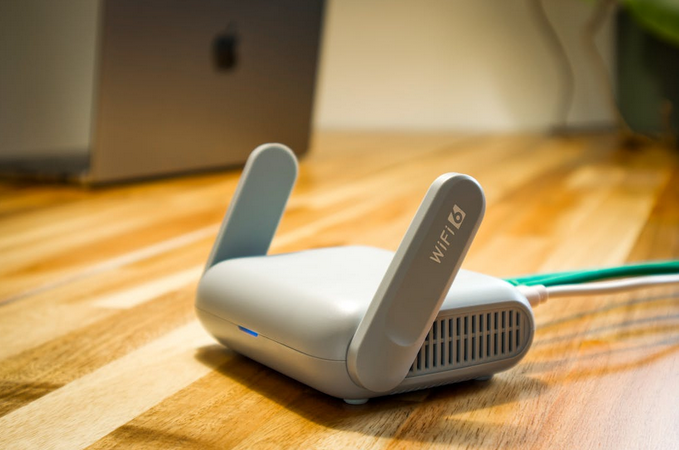
wifi router

Routers age quickly. Not like bread-on-the-counter quick, but pretty close. Manufacturers frequently release updates that fix weak spots. If you ignore them, your router stays stuck with the same old vulnerabilities. A simple update can close holes you didn’t even know existed. Some routers update automatically, but many still require manual action. It’s worth spending a minute checking. Think of firmware updates like oil changes. You may not notice the benefit right away, but skipping them leads to trouble down the road.

If you’ve made it this far, you’re already ahead of most households. WiFi security isn’t mysterious or complicated — it’s a series of quick checks that add up to real protection. A minute today saves you headaches later, and your network will thank you for giving it some attention.…

What Really Happens to Your Old Data After You Delete Apps? (Shocking Truth)

Ever deleted an app and felt instantly lighter, like you just cleaned a messy corner of your digital life? I hate to break it to you, but that little rush of victory might be premature. Removing an app doesn’t always erase the footprints it leaves behind. Let’s unpack this quietly alarming situation.

Why Deleting an App Doesn’t Mean Deleting Your Data

deleting app

See, some of those digital crumbs hang around longer than an uninvited guest who “just stopped by.” But of course, most people assume tapping “delete” is a magic wand. The app vanishes, so the information must vanish too. But many apps stash data in multiple areas—your phone, cloud accounts, or the company’s own servers. They don’t always give you a neat exit plan. That’s where things get tricky. The shock is realizing you may have forgotten the app, yet it hasn’t forgotten you. Even after you’ve hit uninstall, cached files might still sit on your device. Some apps also keep records tied to your login. And unless you manually take action, those scraps stick around. It’s similar to cleaning your closet but ignoring the boxes under your bed. You think the job’s done, but the clutter still exists—just out of sight.

The Hidden Places Your Data Might Still Be Hiding

One of the biggest hiding spots is leftover storage on your device. Many apps create small folders that don’t disappear with the uninstall. They sit quietly, holding anything from images to preference files. Not harmful on their own, but inconvenient when you want a cleaner phone. These remnants can also reveal more about your habits than you realize. Another place is cloud storage linked to your account. Apps love to sync. If you skipped reading the fine print, you may be giving apps permission to stash backups elsewhere. Deleting the app doesn’t automatically erase those. See, your stuff is still there, just somewhere you’re not looking.

How Companies Keep Your Data Even After the App Is Gone

data input

Many apps store user information on their company servers. And removing the app doesn’t trigger an instant purge. Companies may keep data for customer service, analytics, or legal reasons. Some keep it longer than you’d ever expect. It’s all tucked into privacy policies people usually scroll past. Even worse, some companies require a separate step to permanently delete your account. If you don’t do it, your profile may simply “sleep.” Everything tied to it remains intact. Think of it like canceling a gym membership—you might think you’re free, but the paperwork says otherwise.

What You Can Do Right Now to Protect Yourself

First, check for an in-app account deletion option before uninstalling anything. Some apps hide this feature, so you may need to poke around a bit. Deleting your account usually wipes the stored data on the company side. It’s a crucial move many people skip without realizing it. Treat it as your digital goodbye letter. Second, clear the cached files on your device. Most phones offer a simple tool to wipe leftover folders. It only takes seconds, but the difference is huge. You can also review cloud backups to remove any traces left behind. It’s a quick cleanup routine that saves you future headaches.

That’s why being intentional with deletion steps is important. A small action today prevents surprises later. Plus, taking back control of your digital space just feels good. It’s the tech equivalent of airing out a room that’s been closed too long.…